Why the change?
Why the change?
We’re trying to make it easier for you to quickly understand a farming operation and explore more details when needed. Previously, the “network” view displayed too much information at once, which felt overwhelming and confusing. It also wasn’t clear how operations were created, edited, or connected.This change is meant to simplify that experience—so you can get a clear, high-level view first, and easily dive deeper when you want.
- Land: parcels, farms, and locations
- People: contacts and owners
- Financial and activity insights: subsidies, UCC filings, insurance, and more
- Connected operations: relationships with other producers, banks, or partners
What can you expect when you search for an entity name?
What can you expect when you search for an entity name?
- Operations Search now replaces “Owners” in Smart Search results.
- Owners results can now be found within the Parcels section.
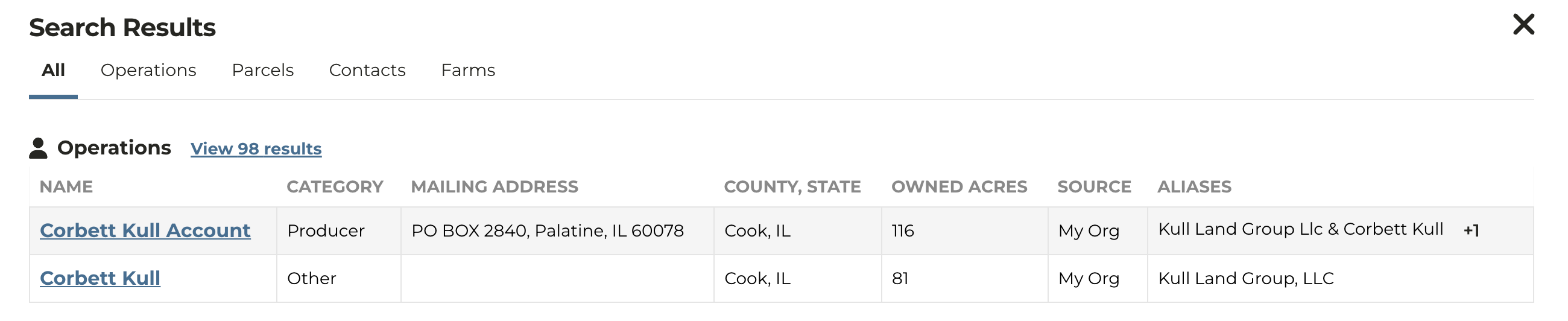
- If your organization has a CRM connected or has uploaded contacts to CamoAg, those contacts will appear first in search results and the source will be noted as “My Org”
- The Source column shows whether an operation comes from your organization or from CamoAg. “My Org” implies the operation is a known contact to your organization.
- Aliases show additional names—either contact names from your CRM or registered owner names if no CRM is connected.
- If you don’t have a CRM connected or haven’t uploaded contacts, search results will be based on your search terms (for example, “Corbett Kull, Illinois”).