• The primary objective of Tags is to enable sales and marketing teams to consistently classify, target, and prioritize producers and related entities using shared, repeatable logic across the Camo platform.
  • This feature supports enterprise readiness by aligning Camo’s producer intelligence with CRM-driven workflows, improving collaboration across teams, and making segmentation a first-class capability in both the map and reporting experiences.

Tags

Overview

Tags are free-form labels that can be applied manually to supported entity types within the platform.

Supported Entities

Tags may be applied to the following entity types:
  • Contacts
  • Operations
The platform supports three tag types: Global Tags — Defined and maintained by Camo; visible across all contacts. These tags are read-only for users. Company Tags — Created and managed by a user in an organization with CamoAg Admin permissions. Admins have full control over the creation and deletion of these tags. Integration Tags — Sourced from external systems such as Salesforce. Editability is configurable per integration; tags may be read-only or editable depending on the integration’s configuration.

UI Requirements

The interface must clearly surface the following attributes for each tag:
  • Tag type — Platform Global, Organization, or Integration
  • Edit status — Whether the tag is editable or read-only in the current context

Managing Organization Tags

Requires the Manage Tags permission
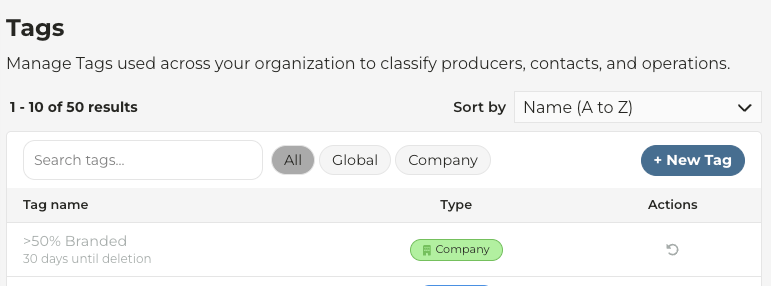
  • Navigate to Account Settings > Tags
  • Click New Tag to create a tag
  • Tags created in CamoAg may be edited or deleted by clicking the appropriate Edit or Delete icons
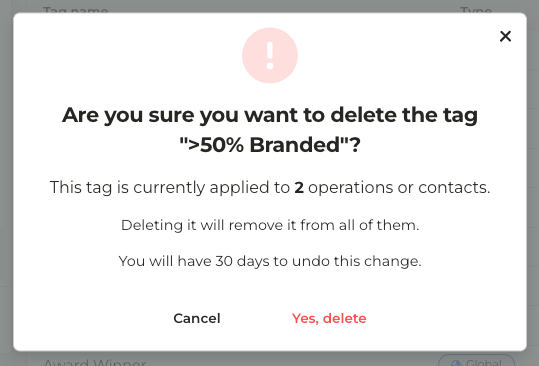
  • Deleting a tag in use will display a message similar to the one below
Deleting Tags

Tags that are not tied to anything are deleted immediately.Tags that are tied to something can be deleted but may be restored within 30 days by clicking the Restore icon under Actions
Last modified on September 14, 2026