> ## Documentation Index
> Fetch the complete documentation index at: https://docs.camo.ag/llms.txt
> Use this file to discover all available pages before exploring further.
# What are Operations in CamoAg?
We’re trying to make it easier for you to quickly understand a farming operation and explore more details when needed. Previously, the “network” view displayed too much information at once, which felt overwhelming and confusing. It also wasn't clear how operations were created, edited, or connected.
This change is meant to simplify that experience—so you can get a clear, high-level view first, and easily dive deeper when you want.
An **Operation** represents a real-world agricultural business, such as a producer, bank, or ag retailer, and brings all related information together in one place, including:
* **Land**: parcels, farms, and locations
* **People**: contacts and owners
* **Financial and activity insights**: subsidies, UCC filings, insurance, and more
* **Connected operations**: relationships with other producers, banks, or partners
This gives you a complete, unified view of how an operation is structured and operates.
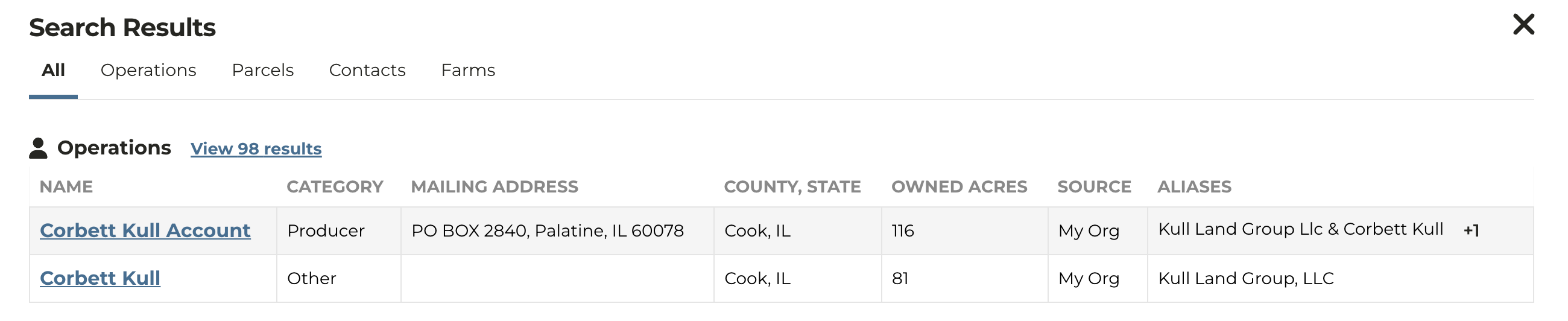
* **Operations Search** now replaces “Owners” in Smart Search results.
* **Owners** results can now be found within the **Parcels** section.
* If your organization has a CRM connected or has uploaded contacts to CamoAg, those contacts will appear first in search results and the source will be noted as "My Org"
* The **Source** column shows whether an operation comes from your organization or from CamoAg. "My Org" implies the operation is a known contact to your organization.
* **Aliases** show additional names—either contact names from your CRM or registered owner names if no CRM is connected.
* If you don’t have a CRM connected or haven’t uploaded contacts, search results will be based on your search terms (for example, “Corbett Kull, Illinois”).